Data Redaction @OneTrust

Overview
OneTrust, the #1 platform for operationalizing privacy, security, and governance, serves over 7,000 clients globally.
Data Redaction, a feature within OneTrust’s Consumer & Subject Requests Product, uses AI to classify and redact sensitive data in unstructured formats (e.g., emails) to streamline privacy request fulfillment.
As the sole designer for this product, I took the feature from concept to launch, collaborating with cross-functional teams to balance technical constraints with an excellent customer experience.
Role & Duration
Sole Product Designer
8 Weeks
Highlights & Stage
Design with AI, SaaS Product
Released 10/2020
Team Structure
1 UX Designers, 1 PM, 4 Engineers
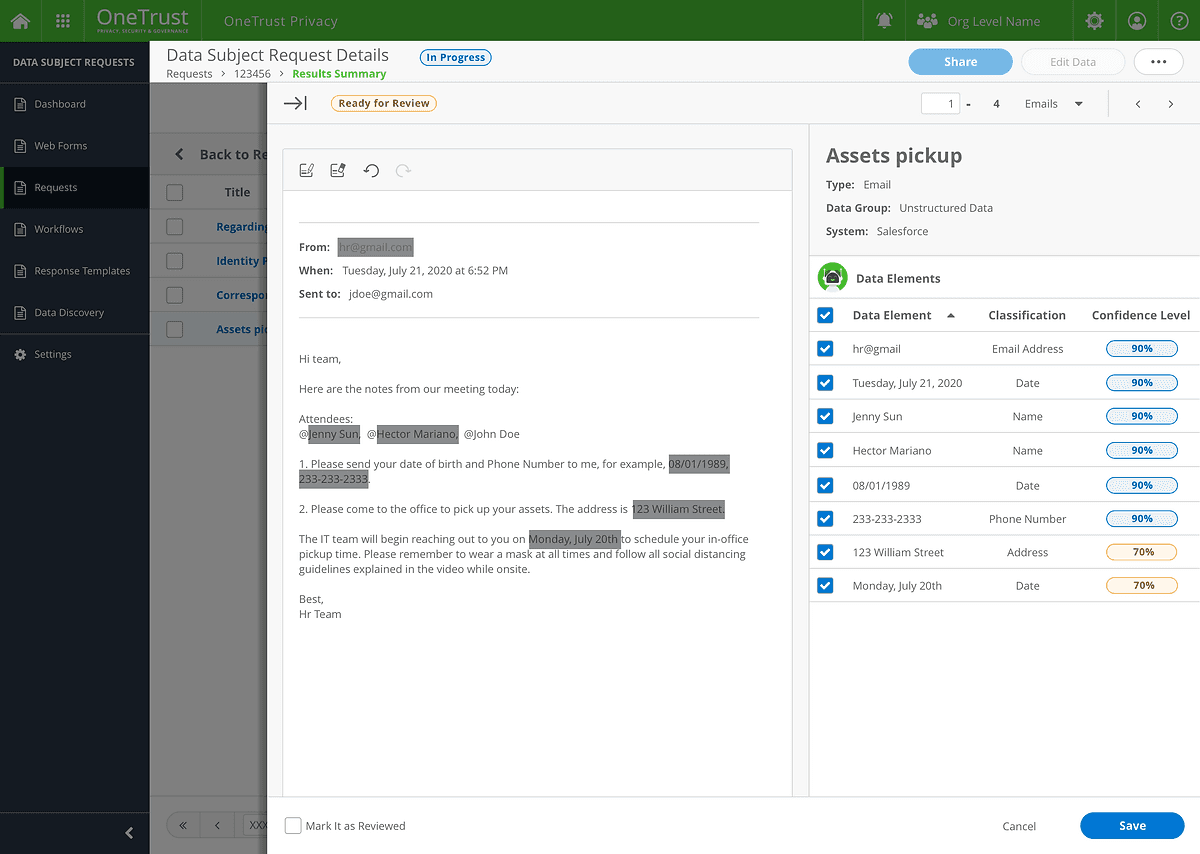
The OneTrust Data Redaction feature leverages AI to automatically detect and redact sensitive data in unstructured formats, streamlining privacy request fulfillment while empowering users with manual review options for accuracy and control.
Background
Addressing Privacy Challenges with AI
What is Data Redaction?
Under privacy regulations like GDPR and CCPA, individuals (Data Subjects) can request organizations to provide, update, or delete their Personally Identifiable Information (PII). Companies must redact sensitive or irrelevant data before sharing this information.
Previously, redaction was manual and required external tools, creating inefficiencies and disjointed workflows. By embedding redaction capabilities into the platform, OneTrust streamlined this process, making the product more attractive to customers.
Current Challenge:
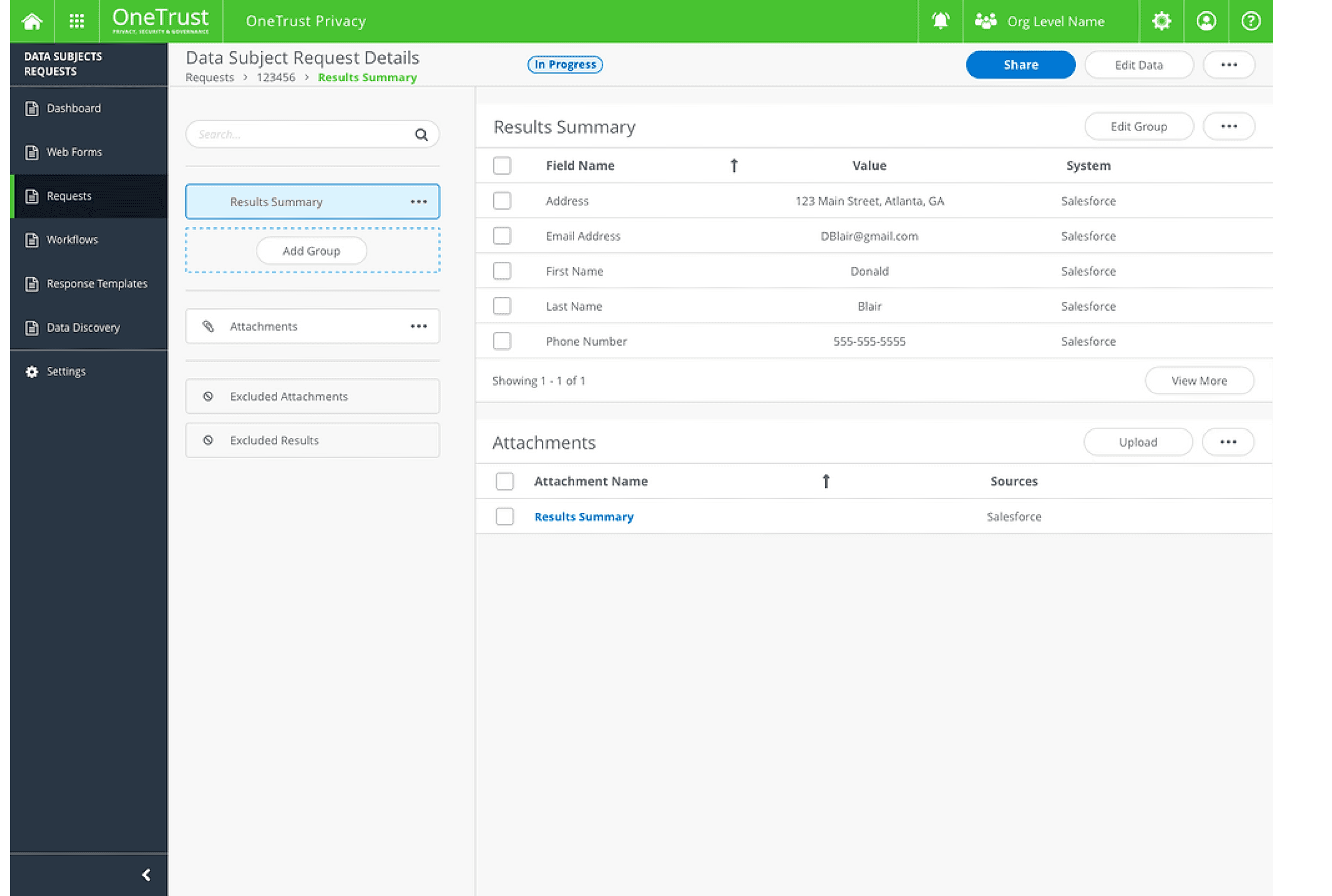
Previously, we only provided clients with a Structured Data Summary, including information such as names, addresses, and phone numbers. When the system collected Personally Identifiable Information (PII), clients could only share this structured data with the Data Subject. Now, if a Data Subject requests a copy of unstructured data, such as emails, we must redact any confidential or irrelevant information before sharing it.
The Challenge
How can we display and manage unstructured data in a way that complements the existing structured data page?
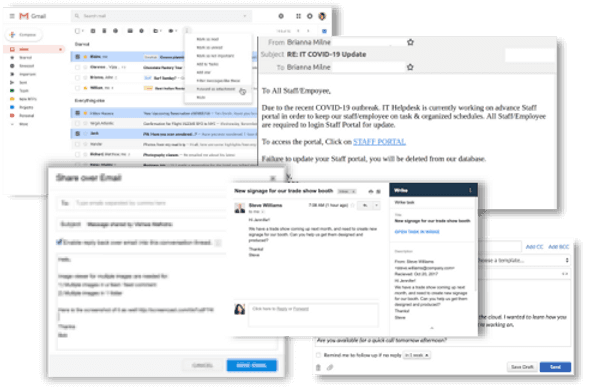
A copy of all PII may come from various data sources and contain different kinds of data:
Structured information from various databases (name, address, phone, etc.)
Emails
Word docs
PDFs
Excels
Chat history
Photos

How do we reduce the redundant efforts involved in reviewing and redacting sensitive data in unstructured formats like email chains?
Employers today may be required to process and send thousands of data sets. For instance, emails referencing the data subject are a major challenge. To fulfill a privacy request for an employee, businesses might need to provide hundreds or even thousands of emails, many of which include information about other individuals or confidential details the data subject is no longer entitled to access.
Final Design Overview
The new feature offered a streamlined experience that balanced automation and manual intervention:
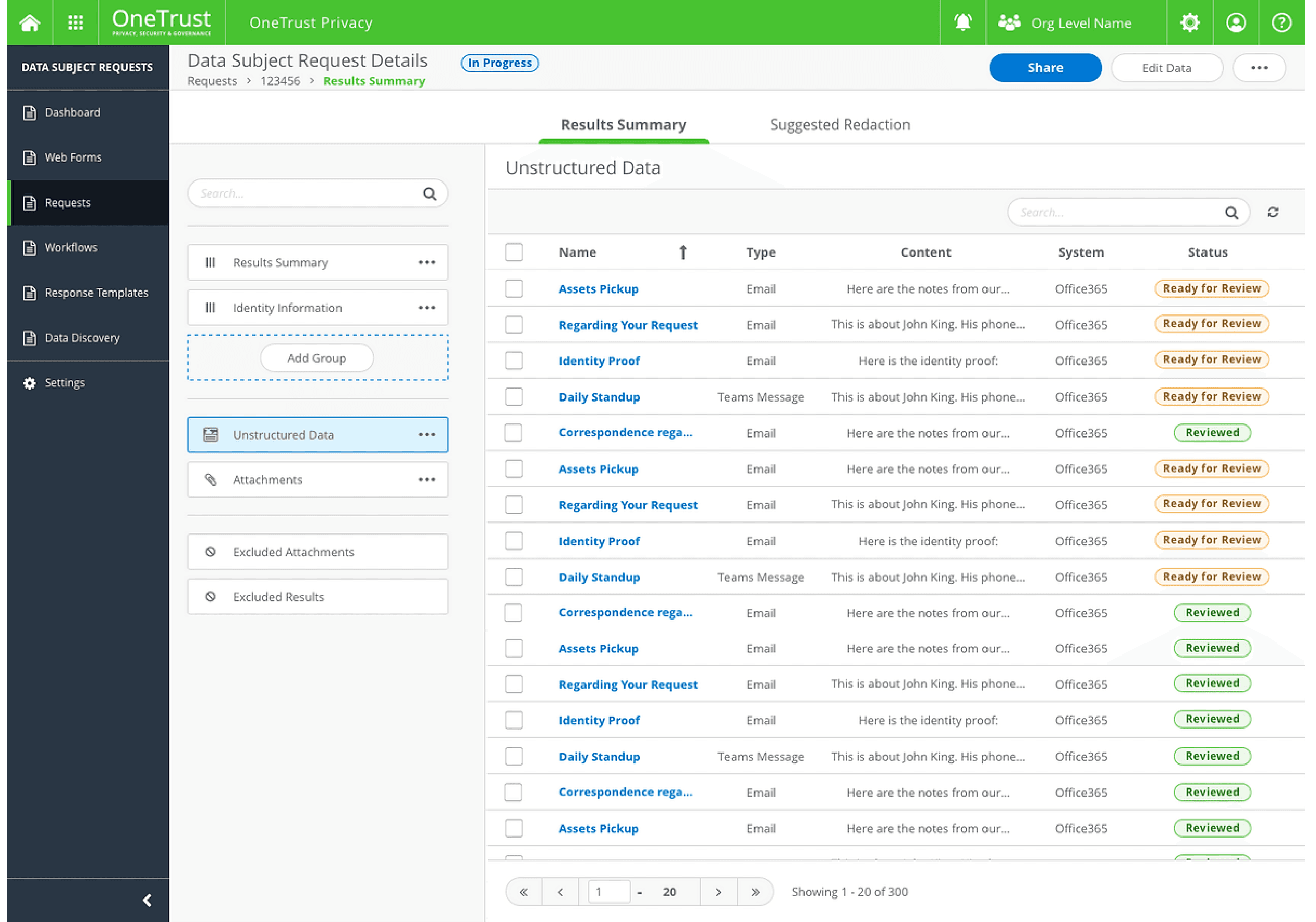
Unstructured Data Collections
A centralized view of all unstructured data records for easy management.
Auto-Redact
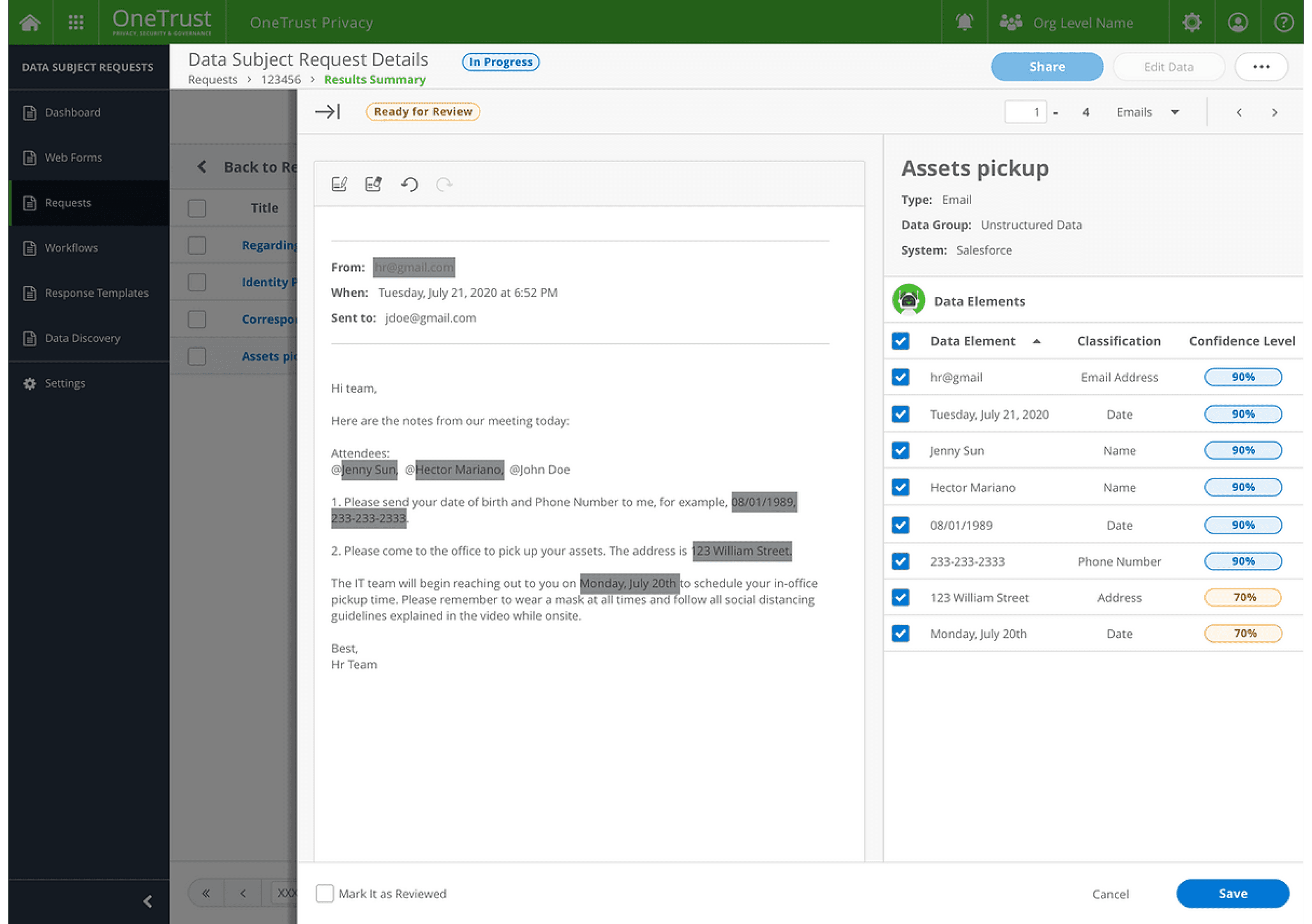
AI-powered classification and redaction of sensitive data, with confidence levels displayed for transparency.
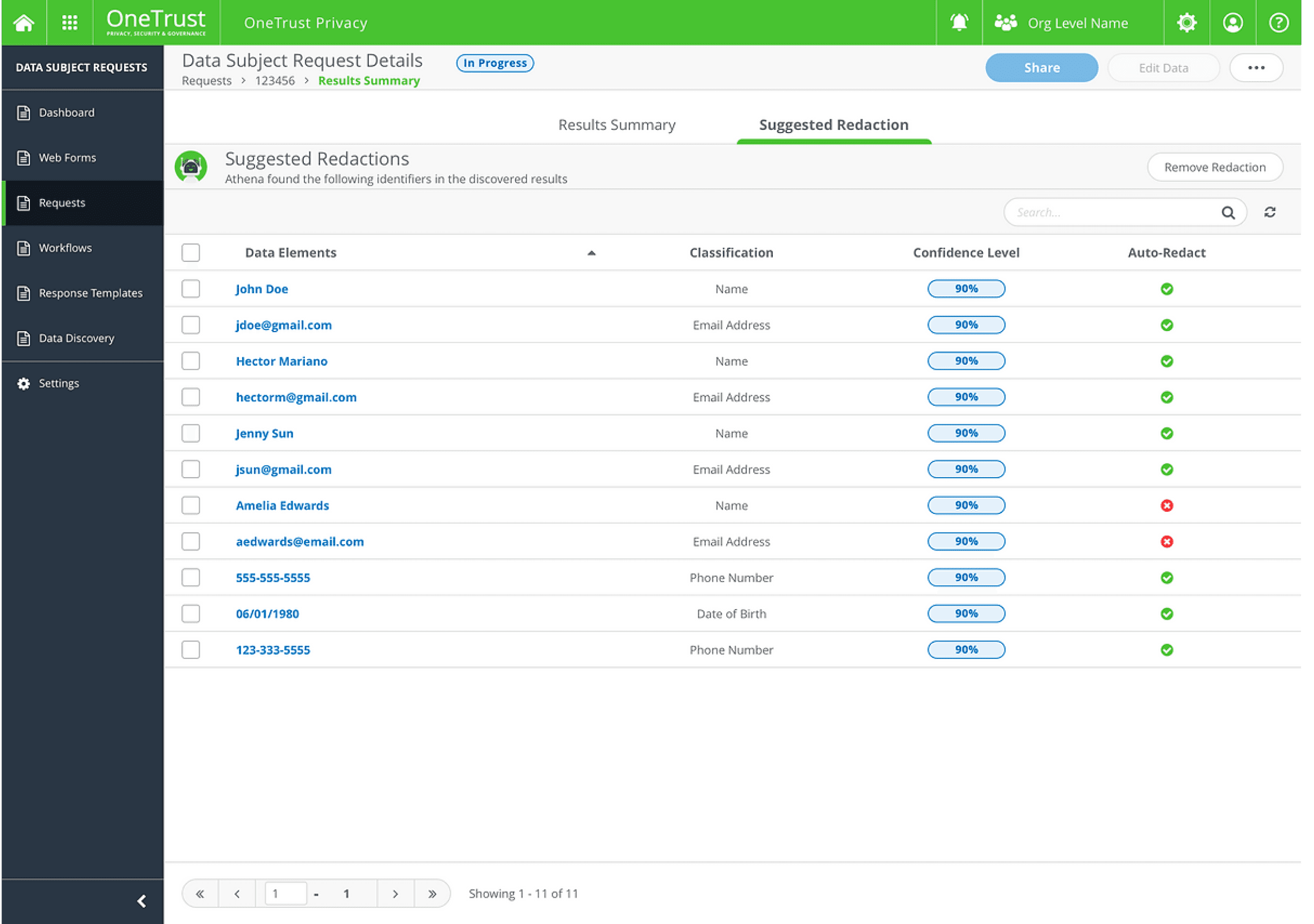
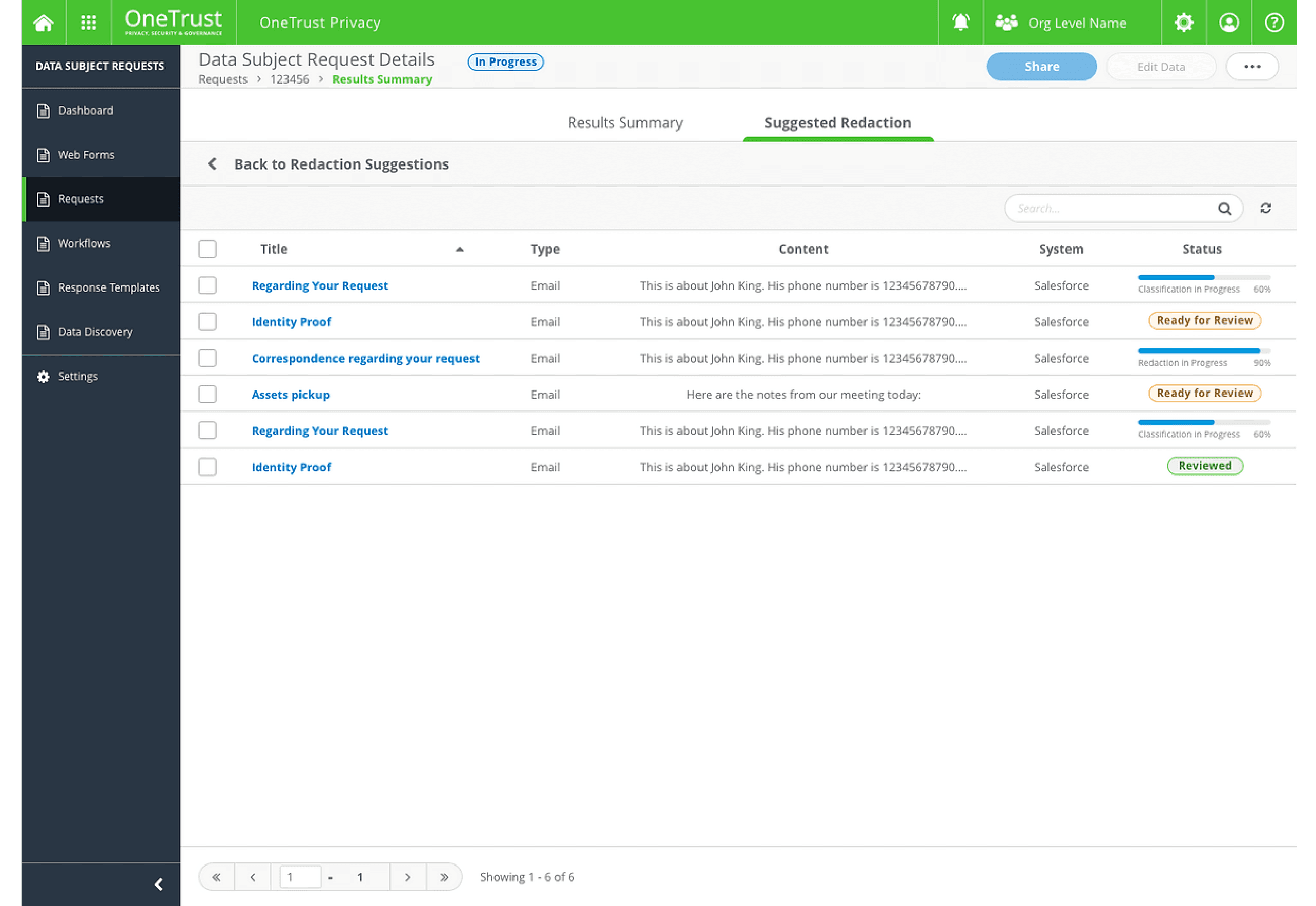
Suggested Redaction
Bulk redaction and prioritization of emails requiring review.
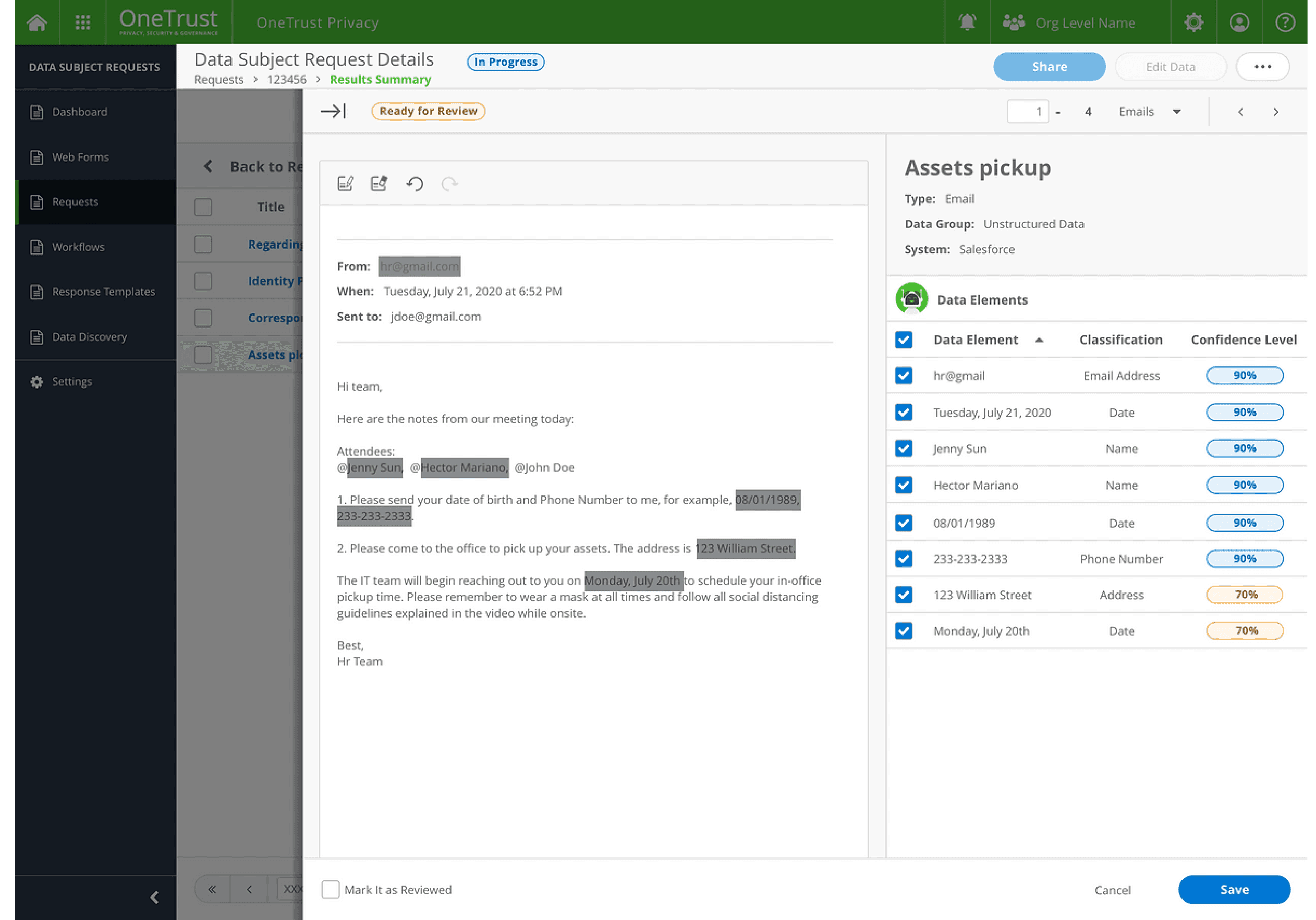
Preview Redactions
Unstructured data preview with darkened highlights for redacted text.
A "Detected Data Elements" section that lists retrieved identifiers with their classification categories and confidence scores.
Results
The redaction feature was launched in production in October 2020 and quickly gained significant attention from our 1,000+ existing clients. Major clients such as Mylan, AON, Marriot, and HCL expressed interest in purchasing the feature during the Demo Showcase Session. Within the first month of its release, the Consumer & Rights Product’s CSAT score increased by 33%.


Design process Highlights
User Research
We began by fleshing out some general goals of what we were trying to understand the Request and Data Redaction, the process of fulfilling requests, and redacting data. From there, we came up with a research plan that outlined a few general questions to ask our potential clients.
These are the key insights that defined the launch of the MVP version of the redaction feature:
Manual and Time-Consuming Process
The current workflow requires users to manually review unstructured data to identify what can or cannot be shared, making the process tedious and inefficient.
Among the unstructured data. Email is an "absolute nightmare"
Emails are a significant pain point, with large volumes posing a major challenge. For instance, fulfilling a DSAR for a two-year backlog of bi-weekly newsletters once required reviewing 14,000 emails.
Automation Alone Isn’t Enough
While automation helps, customers often lack confidence in automated redaction and need to manually review and refine the results to ensure accuracy and compliance.
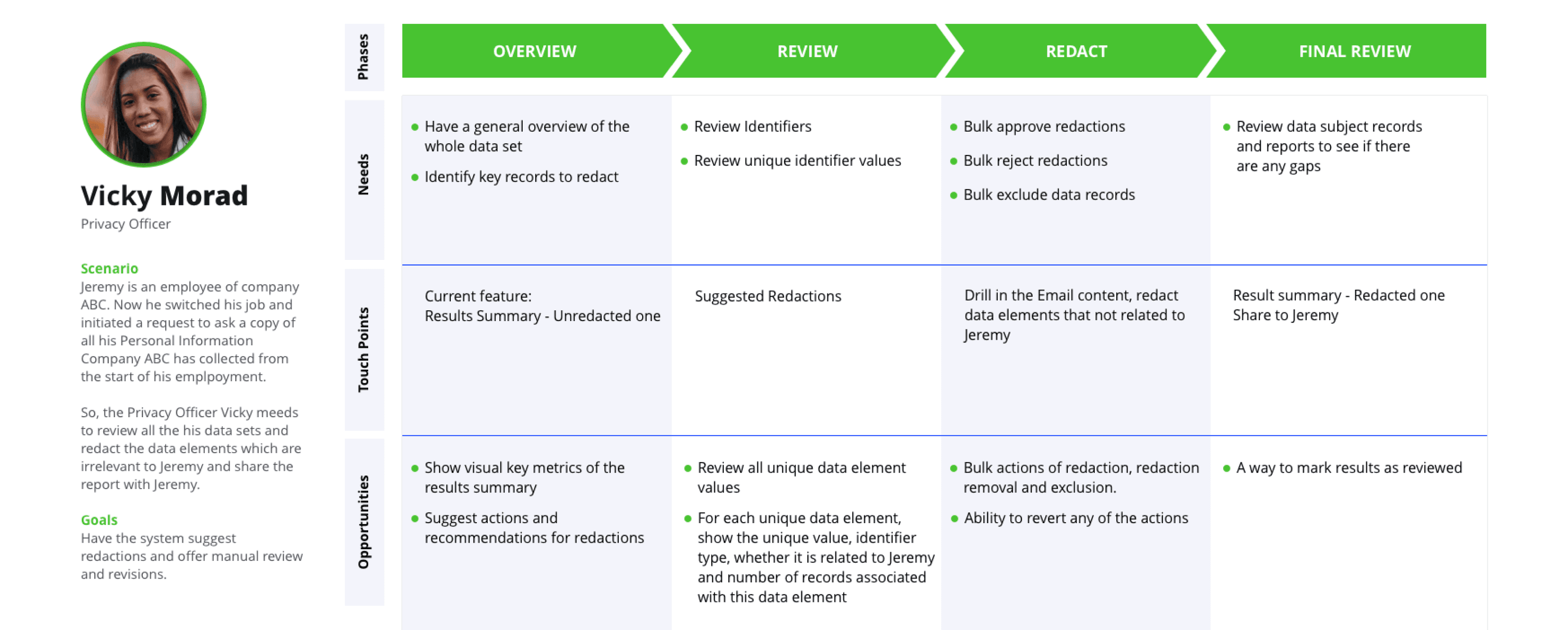
Online Design Workshop to Identify Solution in MVP Scope
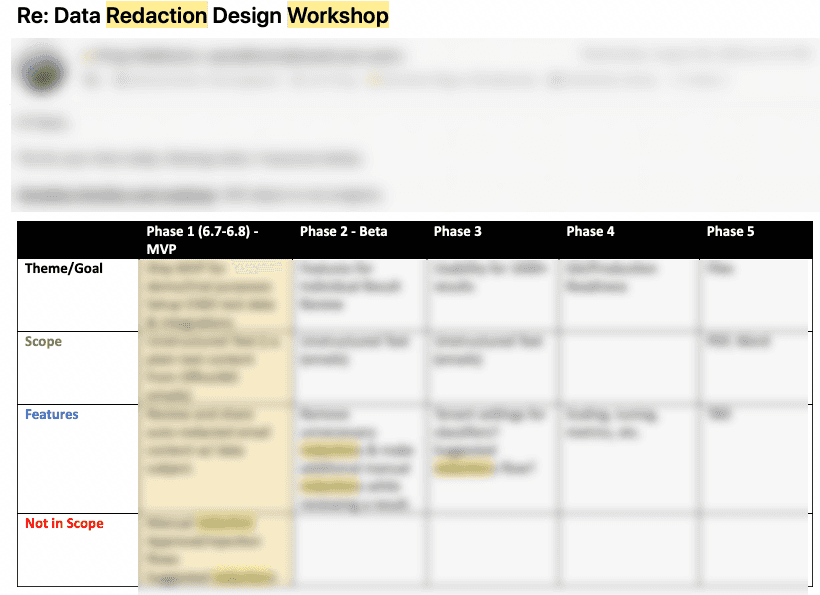
Based on the user research insights, I organized a design workshop to align the team on findings and customer journey maps.
As a team, we identified the key issues that my design needed to address:
Display unstructured data: Focus on emails as the primary data type for Phase 1.
Reduce processing time: Automate the redaction process to streamline workflows.
Identify relevant data: Implement a system to flag emails requiring review for redaction.
Enable manual redaction: Provide tools for users to manually redact data when automation falls short.
Design Challenge Highlights
Designing around AI - How to help users trust the automated redaction results?
Automating the redaction process introduced unique challenges for me, as it was my first experience designing around AI. Through user research, I discovered that while users appreciated the efficiency of automated redaction, they remained cautious about sharing the redacted results with the data subject (the requester), reflecting a lack of complete trust in the system.

Design Strategy 1: Differentiate AI content visually to set the expectations
Providing suggested redactions with a Confidence Score helps users understand that the content was generated by an algorithm, allowing them to assess whether to trust the results. Clearly marking these as predictions sets appropriate expectations for users when reviewing the redaction suggestions.

Design Strategy 2: Showing competence
Linda, a privacy officer, is responsible for ensuring that all sensitive information is securely redacted. When she opens a case, she reviews a list of unstructured data with redaction results confidently provided by her AI assistant, Athena, based on its algorithm.
By reviewing similar cases, Linda:
Understands the logic behind the AI-generated redactions.
Validates the results based on her own experience, confirming their accuracy.
This process reassures Linda that the system is competent in classifying sensitive data and performing reliable redactions.
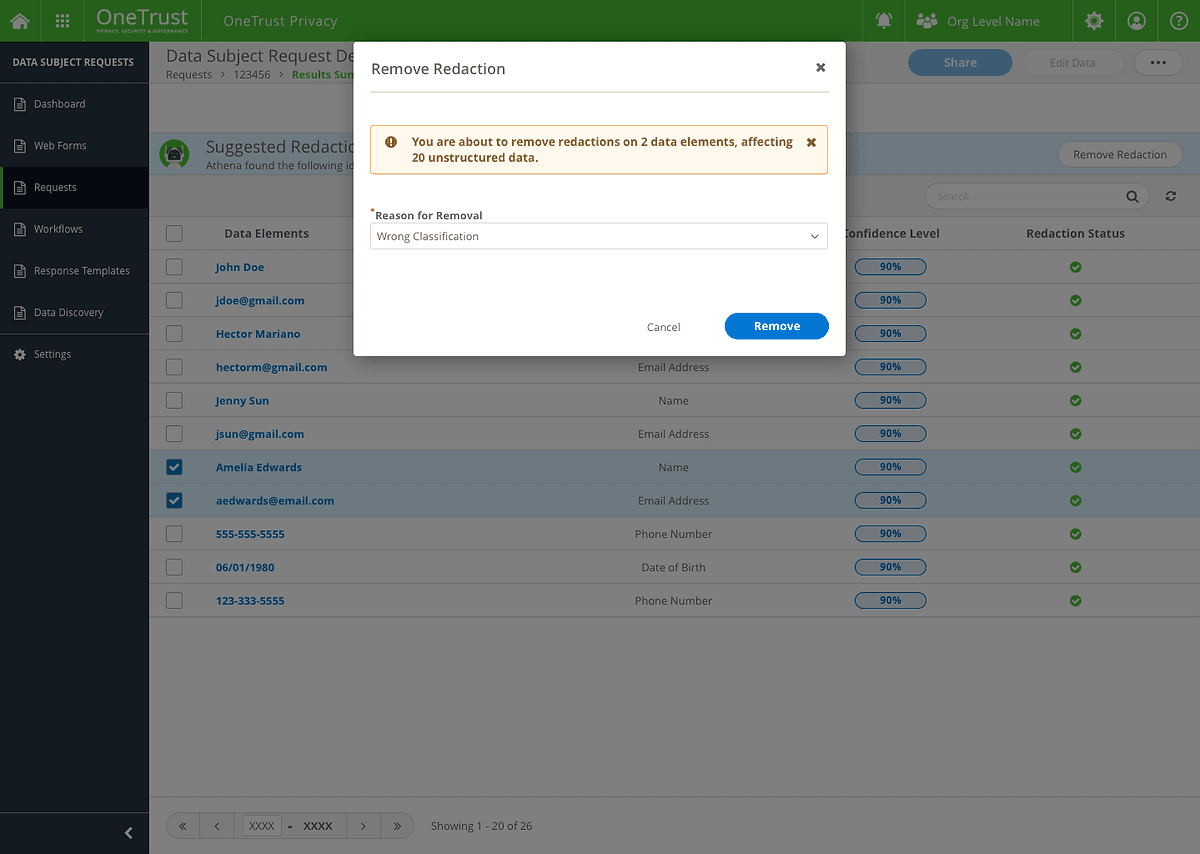
My Design strategy 3: Provide an opportunity to give feedback
When users remove the redactions, there would be a modal to asked them why they want to remove that redaction, which can better report and train the system.
Is the automated process solving all problems?
The answer is "No." While many customers request an automation feature to eliminate the need for reviewing and manually redacting all data records, we found that: Customers still need to review data records manually to redact undetected data elements and exclude incorrectly redacted ones.
Customers require greater confidence in the redacted results before sharing them, as they don’t fully trust the system yet.
With these insights in mind, I began exploring how to strike the right balance between automation and manual intervention to meet user needs effectively.
What are the tasks people want AI to handle?
Classify and redact the sensitive data in unstructured data
What are the tasks people want to do themselves?
Review the redaction results
Manual redaction.
To better balance automation and manual work, I iterated on the user flow through multiple versions:
Version 1
The system classified the data, and users manually approved which elements to redact across all unstructured data.
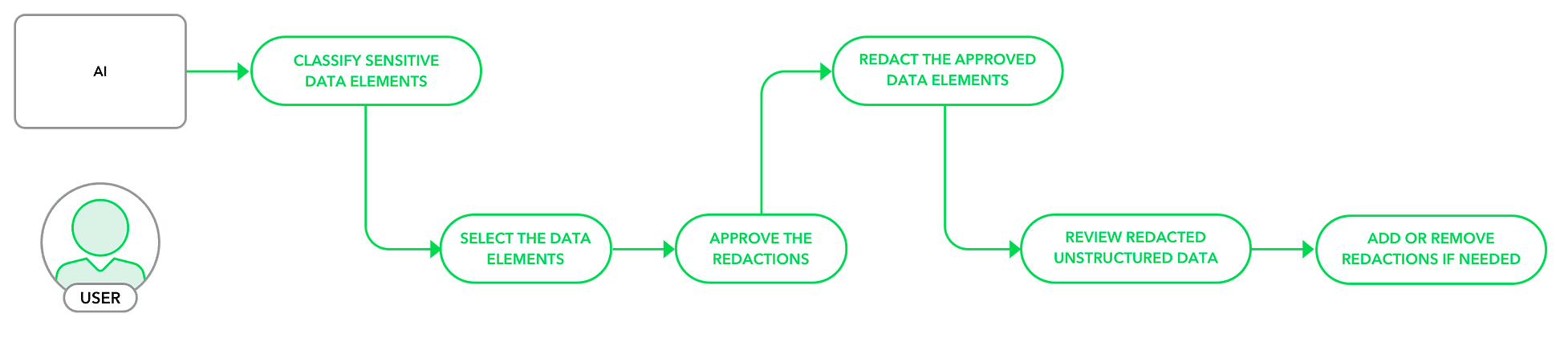
Version 2
The system both classified and redacted the data automatically, allowing users to review and remove data elements they didn’t want to redact.
After conducting an additional round of client calls, we chose Version 2. This approach minimized user actions, as the number of elements requiring removal was significantly smaller than the number needing redaction. This streamlined the process while maintaining user control and efficiency.

How to drill into the unstructured data?
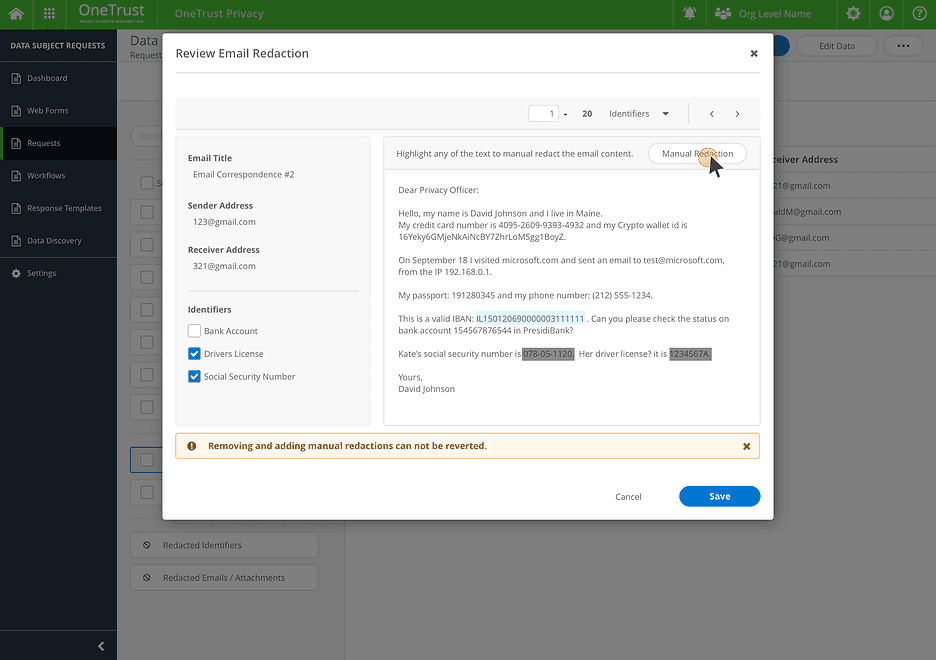
Modal
Modal cannot display enough information when the email is too long.
Less request information inputs, easy to lose the context.

Drawer V1
Users wanted to view data elements detected more clearly.
Hard to remove auto-redaction and revert manual redaction.
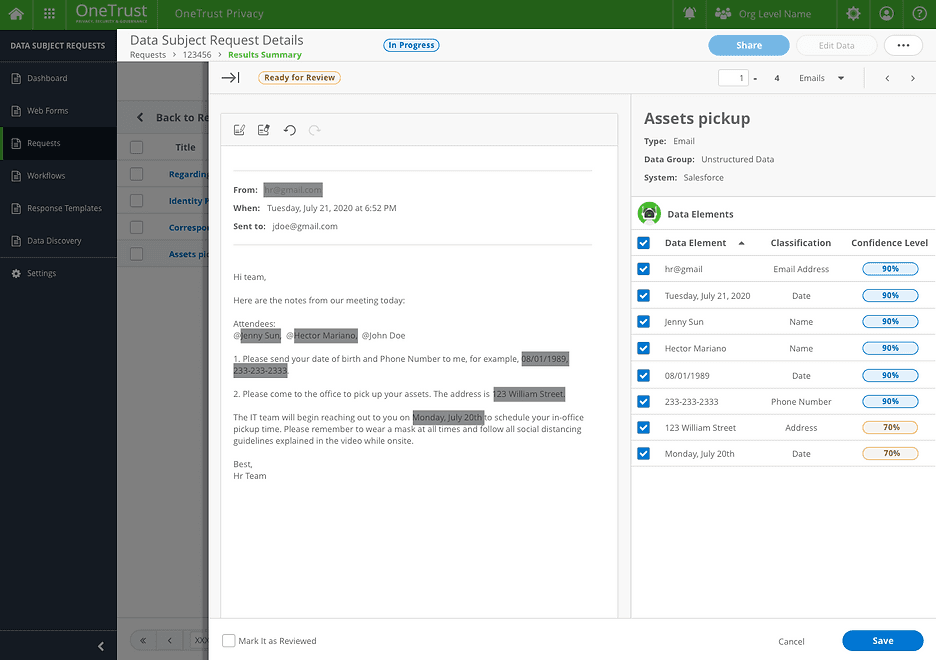
Drawer V2
Clear Information Hierarchy
Show both the content view and data elements table.
Take actions easily.
Too many redaction statuses during the redaction process
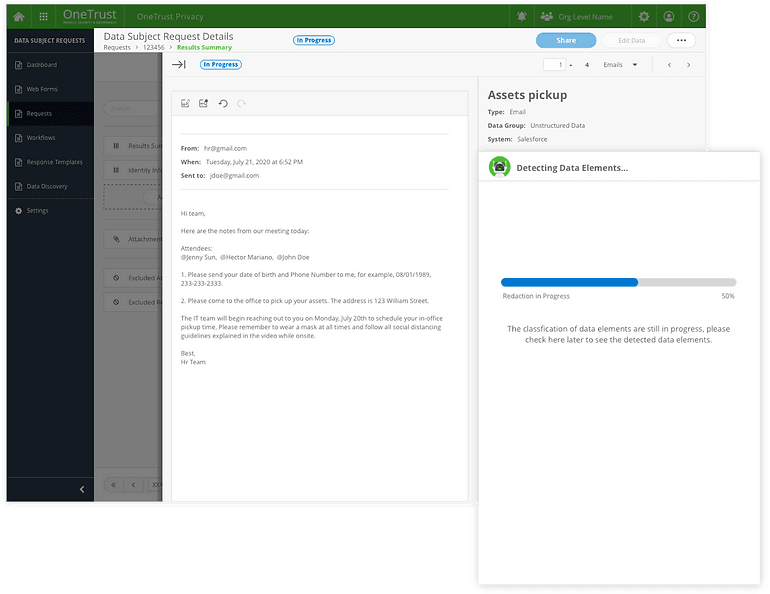
When initiating redaction, the process involves multiple stages and can take several hours to complete. How can we provide users with timely and appropriate feedback to keep them informed throughout the process?

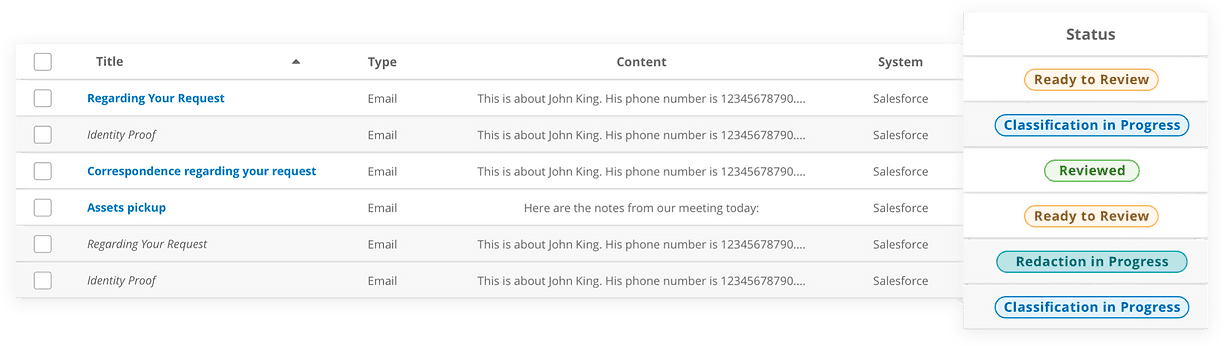
Version 1: Displaying Status with Badges
Using badges for each status overwhelmed users, as the variety of badges created unnecessary distractions.
Users frequently refreshed the page to check for updates on status changes.
Rows for emails undergoing redaction were disabled, but during user testing, users expressed the need to access emails even while redaction was in progress.
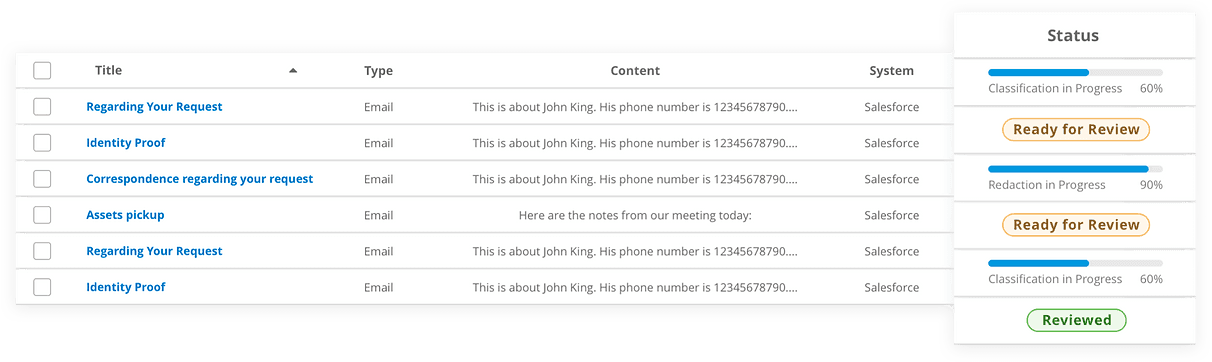
Version 2: Progress bar to indicate the progress
The progress bar indicates how long it's going to take.
Remove the disabled state. Users could still check the Email Content.
Next Step
Design for better scaling
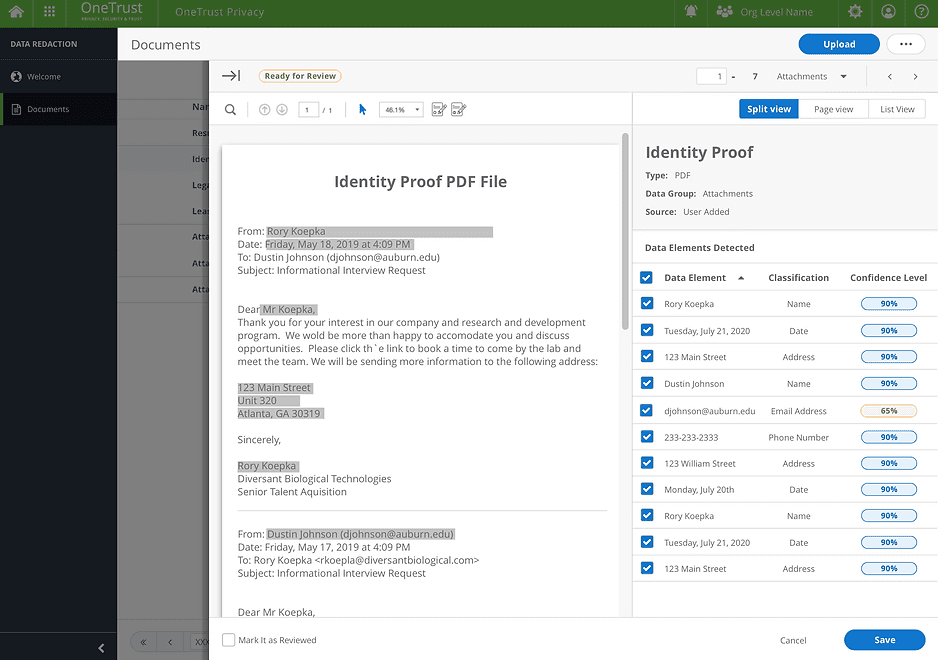
In Phase 1, we focused solely on Email Redaction, with plans to expand to PDF and Image Redaction in the future. Throughout the design process, I considered how the design could accommodate other unstructured data types, such as PDFs. I explored different ways to present both unstructured data and the detected data elements, ensuring the design could seamlessly scale to support various data formats.
Takeaways
Align Design with Long-Term Goals
While starting with an MVP, it’s crucial to consider scalability and avoid creating "UX debt." Prioritizing quick and easy solutions might help meet short-term deadlines but can lead to significant experience issues over time, ultimately affecting user satisfaction and the product's success.
Foster Collaboration Across Teams
This project required close coordination among design, engineering, and data teams spread across three countries. Daily standups and weekly demo meetings proved highly effective, allowing us to align on priorities, discuss effort levels, and foster trust and respect between design and engineering teams, ensuring smoother collaboration.
Master the Art of Designing with AI
Designing AI-powered products presented a unique and exciting challenge. Like any human-centered design process, the key is identifying the right problems to solve. Throughout the project, I continually asked: What tasks should AI handle? What tasks should users control? Striking the right balance between automation and manual interaction was a valuable lesson that shaped the final design.
Thanks for Stopping By
Evie Xu